Free Download · Excel & Google Sheets
Know what to reorder — and catch dead stock before it eats your cash.
A free inventory reorder point calculator that turns your stock list into two ranked action lists: what to buy right now (and how much), and any dead stock tying up money. Works in Excel and Google Sheets. No macros, nothing to install.
Free. Email required so we can send the file. No spam — you can unsubscribe anytime.
You know your stock count. But the count doesn’t tell you the two things that matter this week: what to reorder before a winner runs out, and which items have quietly become dead capital. This calculator adds those answers — so the order sheet, not the shelf, decides your cash flow.
What the free reorder point calculator shows you
A ranked reorder list — most urgent first
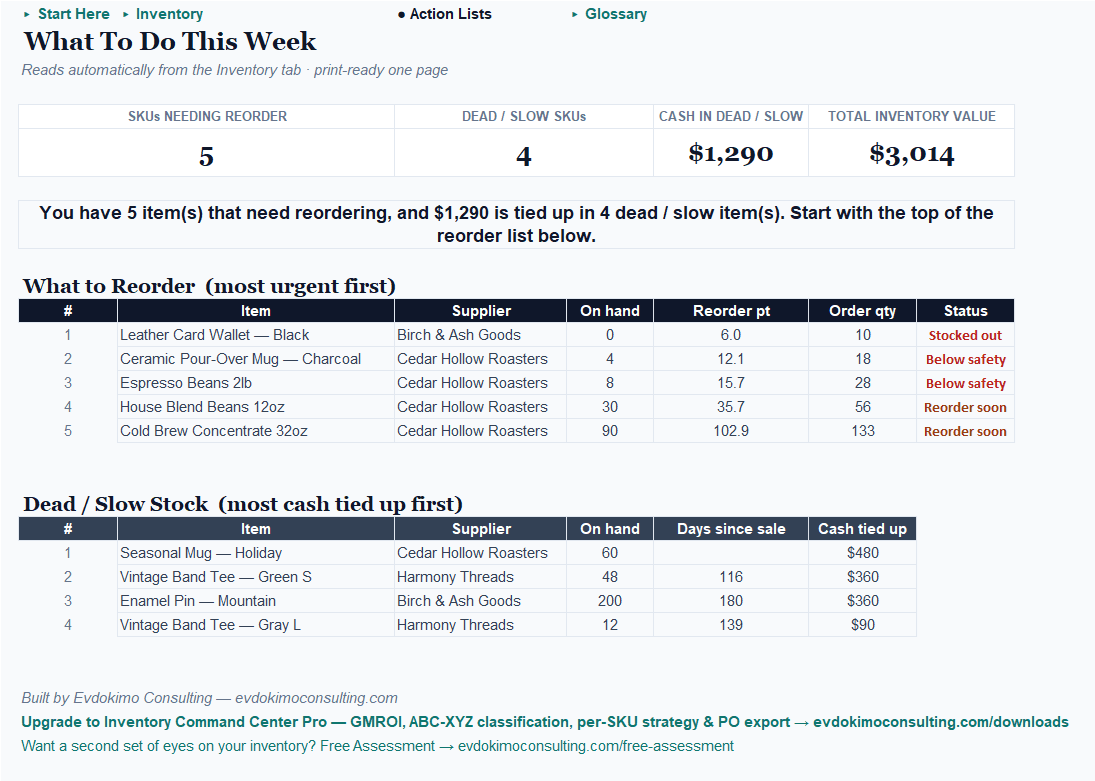
Every item at or below its reorder point, most urgent first — a stocked-out item tops the list — with a suggested order quantity for each.
How often you run out
Dead stock, ranked by the cash trapped in it
Items with no recent sales or far more cover than they need, sorted by the money trapped in them — so you clear the biggest dollars first.
Cash tied up in stock
One plain-English signal for the week
Four numbers at the top — items needing reorder, dead and slow items, cash in dead stock, and total inventory value — plus one sentence telling you what to do this week.
What to do this week
Works in Excel and Google Sheets (no macros)
Round-trip verified in both — upload it to Drive and it works identically. Setup is three steps and about 60 seconds of typing.
Step 1
Paste your stock list
Type or paste what you carry — item name, cost, on hand, weekly sales, and supplier lead time.
Step 2
Set five plain-English settings
Safety cover, review period, and the dead-stock rules — no formulas to touch.
Step 3
Read the Action Lists tab
The reorder list, the dead-stock list, and the signal line. Update on-hand counts anytime for a fresh read.
Already planning ahead? This calculator is fed by the Demand & Sales Forecaster — its demand plan pastes straight into your weekly sales-rate inputs, so your reorder points reflect where sales are heading, not just where they’ve been.
See it in action: the sample shop example
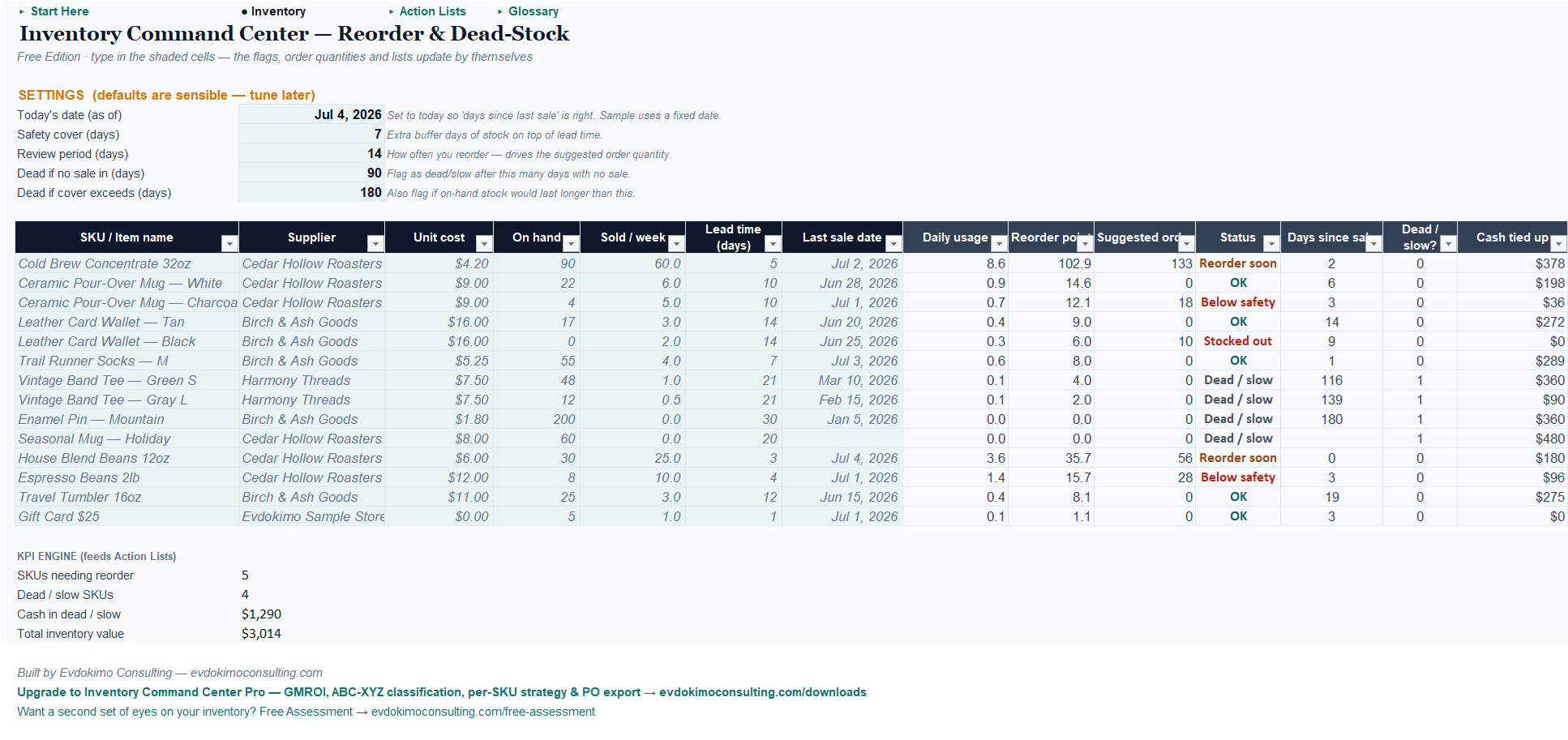
The workbook ships pre-filled with a fictional coffee-and-goods shop, sized so every state fires. These are its actual dashboard numbers. Open it, see every flag light up, then type over the example with your own stock list.
Free vs. Pro: the full decision system for every product you carry
Start free. Upgrade when you want the full playbook for every product you carry — Pro adds more decisions and less manual work, never “unlocking the basics.”
| Free — Reorder & Dead-Stock | Pro — Stock Health & Full Decision System | |
|---|---|---|
| Price | Free (email) | $49 one-time |
| Platform | Excel and Google Sheets | Excel only (macros) |
| Ranked reorder list + suggested quantities | ✓ | ✓ |
| Dead-stock list ranked by cash tied up | ✓ | ✓ |
| Plain-English weekly signal | ✓ | ✓ |
| Safety stock | Simple cover buffer | Statistically grounded, from your service level |
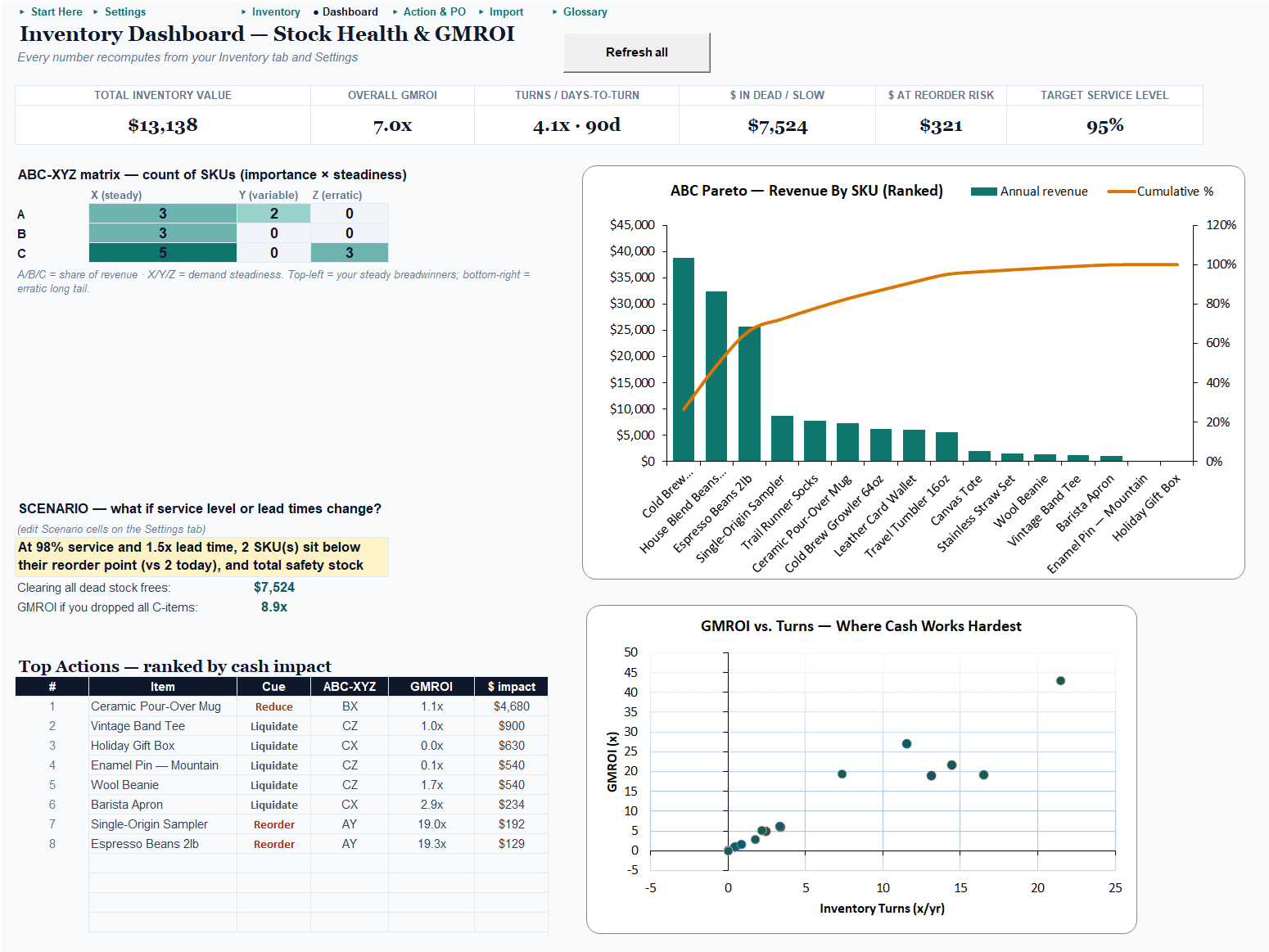
| Product classification (importance × predictability) | — | ✓ visual matrix |
| Return on every inventory dollar + how fast stock turns | — | ✓ per item and overall |
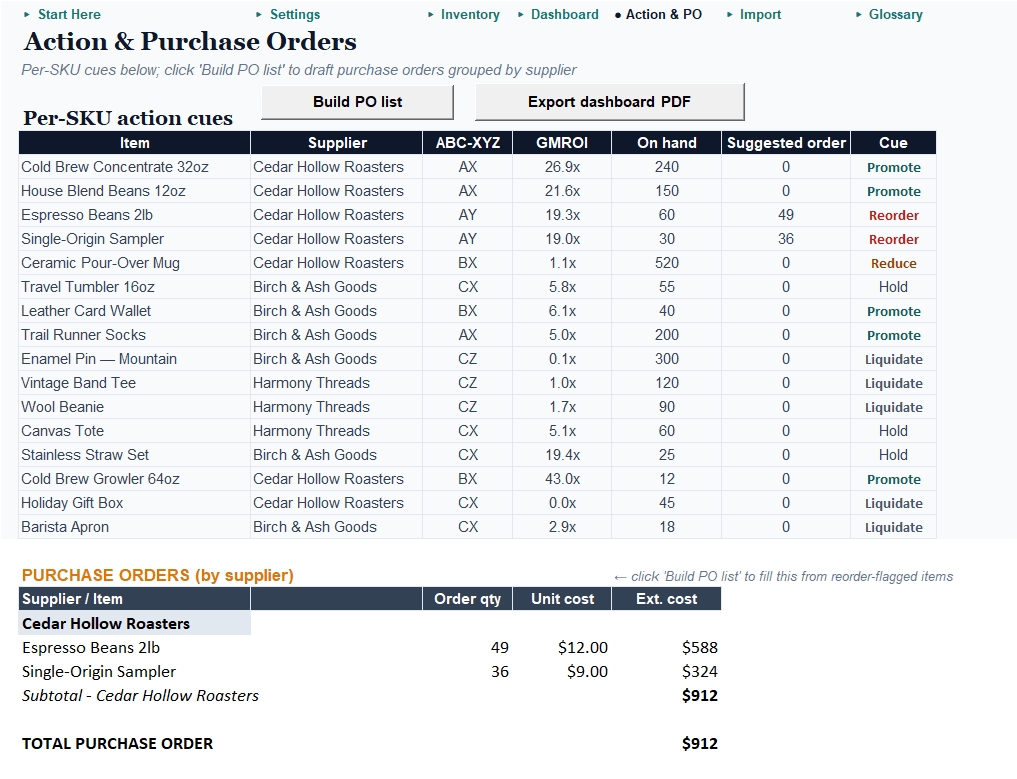
| Five action cues per item (reorder/hold/reduce/liquidate/promote) | — | ✓ |
| Top actions ranked by dollar impact | — | ✓ |
| What-if panel (service level, lead times) | — | ✓ |
| Purchase-order lists grouped by supplier | — | ✓ one click |
| Shopify catalog import | — | ✓ |
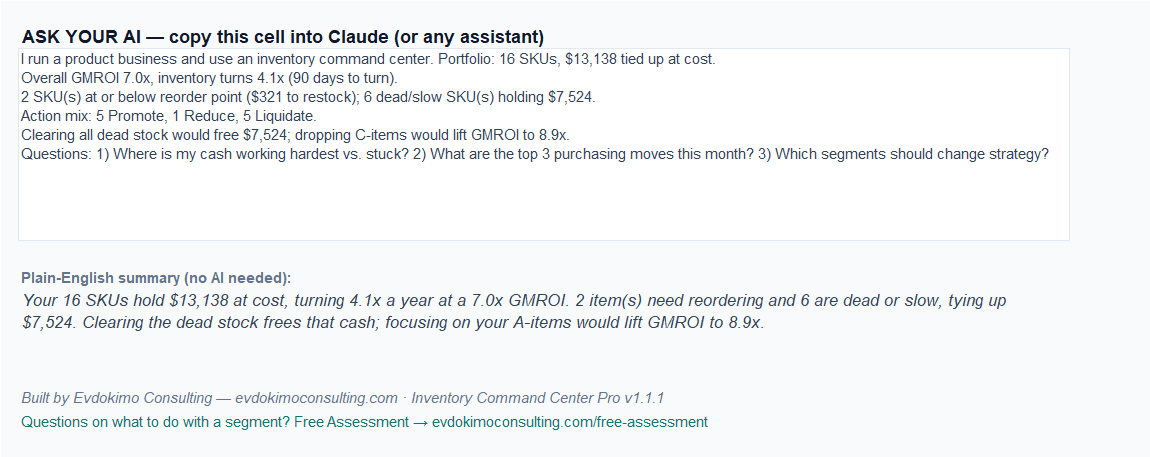
| Paste-into-Claude AI commentary | — | ✓ (+ no-AI fallback) |
| Catalog size | Your stock list | 1,000+ items |
Free tells you what to buy and what’s dead. Pro tells you what to do with every single product you carry.
Ready to know the return on every dollar on your shelf?
Pro turns the stock list into a complete decision system — it classifies every product by how much it matters and how predictably it sells, measures the return on every inventory dollar and how fast each item turns, sets statistically grounded safety stock from your chosen service level, and gives every single item one of five cues: reorder, hold, reduce, liquidate, or promote. One-click purchase-order lists grouped by supplier. Imports your Shopify catalog. Excel, one-time purchase.
Find it, then fix it: add the Markdown Optimizer.
The Command Center finds dead and slow stock and ranks it by the cash trapped in it. The Markdown & Liquidation Optimizer recovers it — the markdown depth that nets the most cash, liquidate-vs-hold calls, and a dated markdown calendar. Its import takes this tool’s dead-stock list in one paste. Both Pro editions, one purchase — $69 vs. $88 separately.
Get the free reorder point calculator
Enter your email and we’ll send the download link — plus a short series on getting more decisions out of the stock list you already have.
We'll email the download link. No spam — unsubscribe anytime.
Every engagement comes with a number — the free tools included. Want a second set of eyes on your actual inventory? Start with a free assessment →
Frequently asked questions
Is it really free?
Yes — the Reorder & Dead-Stock edition is a free download; we ask for your email so we can send the file and occasional useful tips. Unsubscribe anytime.
Do I need Excel, or does Google Sheets work?
Either. The free edition uses no macros and is round-trip verified in both Excel and Google Sheets — upload it to Drive and it works identically.
What's a reorder point?
The stock level at which you need to order again so you don't run out before the new order arrives. The calculator sets one per item from your sales rate, supplier lead time, and a safety cushion you choose.
How do I find my dead stock?
The calculator flags items with no recent sales or far more cover than they need, and ranks them by the cash trapped in them — so you clear the biggest money first.
What does the Pro version add?
A full decision system: every product classified by importance and predictability, the return on every inventory dollar (GMROI), statistically grounded safety stock, five action cues per item, one-click purchase orders by supplier, and Shopify import. One-time $49.
Will it work for my kind of business?
If you carry physical stock — retail, e-commerce, makers, parts and supplies — yes. You need your item costs, rough weekly sales, and supplier lead times; the example data shows exactly where each goes.
Let’s find your number.
Start with the free reorder point calculator — or tell me what you’re working on, and we’ll find the one metric worth moving first.