Free Download · Excel & Google Sheets
Know what you keep on every sale — after every fee.
A free ecommerce profit calculator with fee presets for Amazon FBA, Shopify, Etsy, eBay, Walmart, and TikTok Shop. See your true profit per unit after every fee, ad dollar, and return — plus the price below which you lose money. Excel and Google Sheets. No macros.
Free. Email required so we can send the file. No spam — you can unsubscribe anytime.
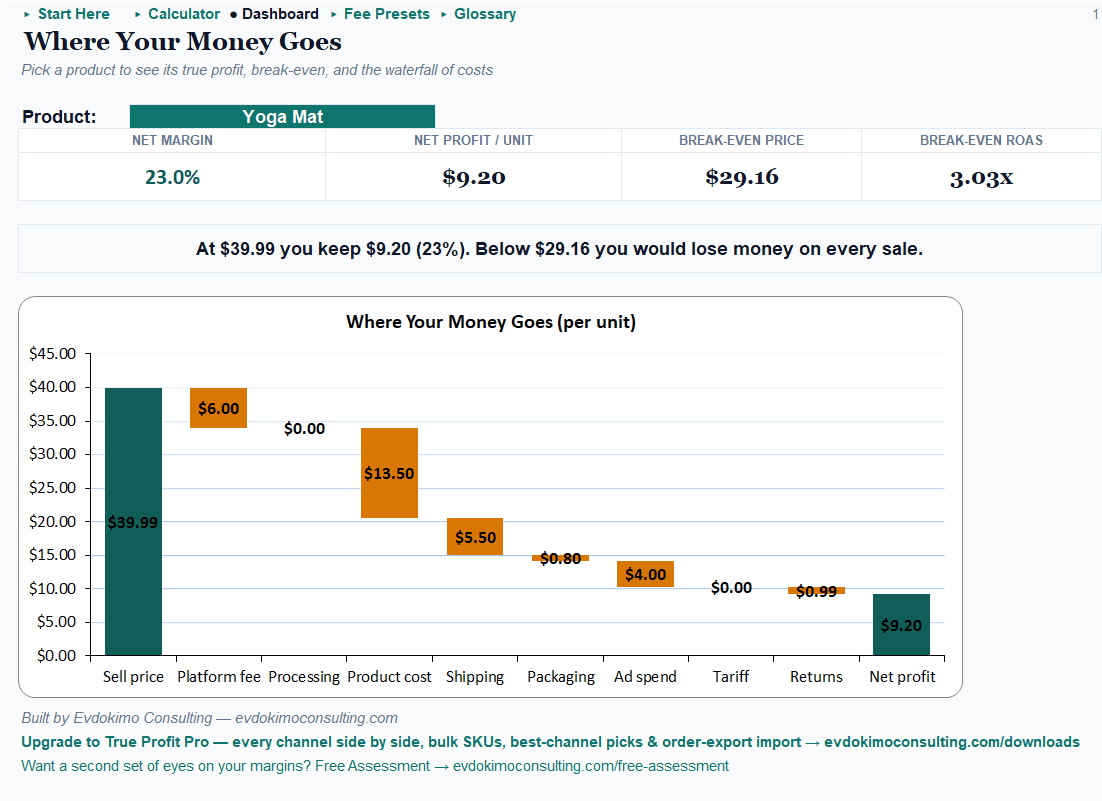
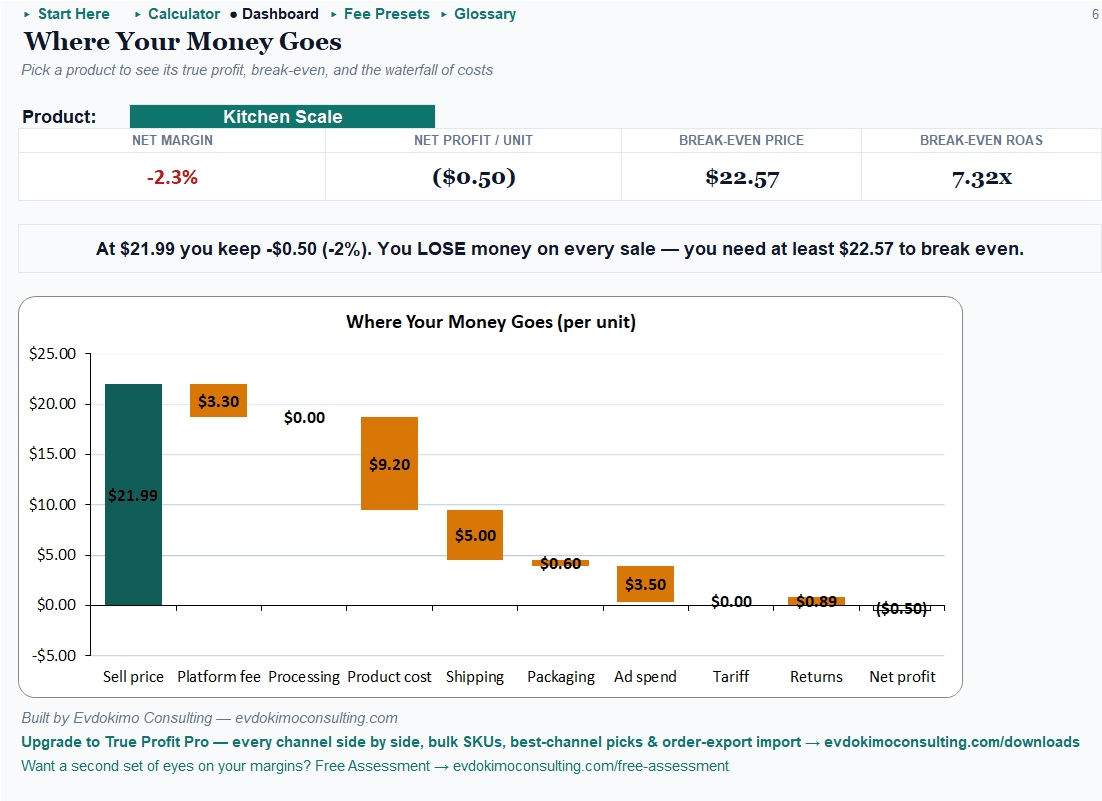
The platform reports the $39.99 sale. Then the referral fee, processing, fulfillment, the ad click that brought the buyer, and the occasional return each take their cut — and what’s left is $9.20. Sometimes it’s less than zero: the sample’s kitchen scale sells at $21.99 with a $22.57 break-even, losing money on every sale. That’s a number worth knowing per sale, today — not once a year in the accountant’s summary.
What the free ecommerce profit calculator shows you
Profit per sale
True profit per unit — after every fee
Price minus everything: platform fees, payment processing, fulfillment, packaging, ad spend, returns, and tariffs — the number that actually lands in your pocket.
Your biggest cost
Where your money goes, drawn to scale
Every deduction in one waterfall, drawn to scale, so the biggest leak is visible at a glance.
Your floor price
Your break-even price and break-even ad spend
The price below which you lose money, and the ad efficiency (break-even ROAS) you must beat to stay profitable — both floors, side by side.
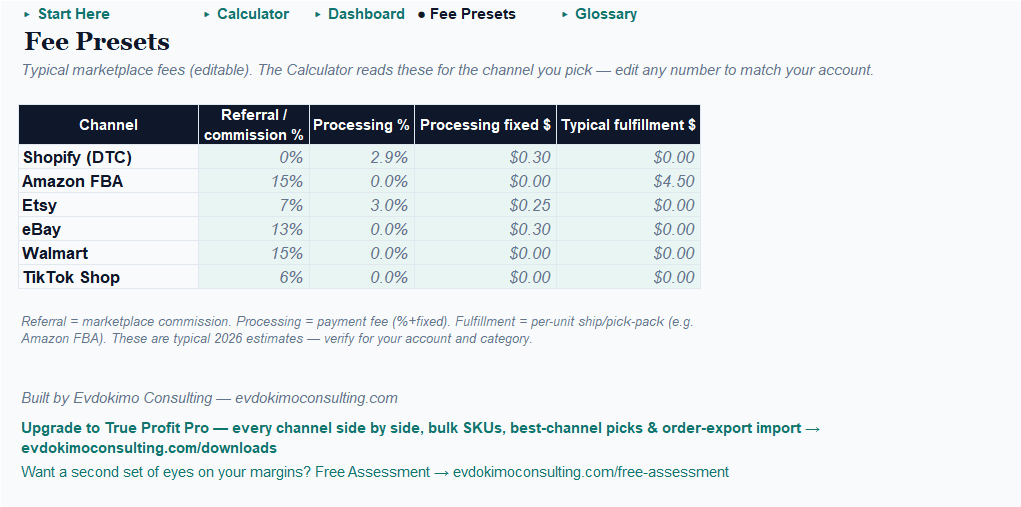
Fee presets for Amazon FBA, Shopify, Etsy, eBay, Walmart & TikTok Shop
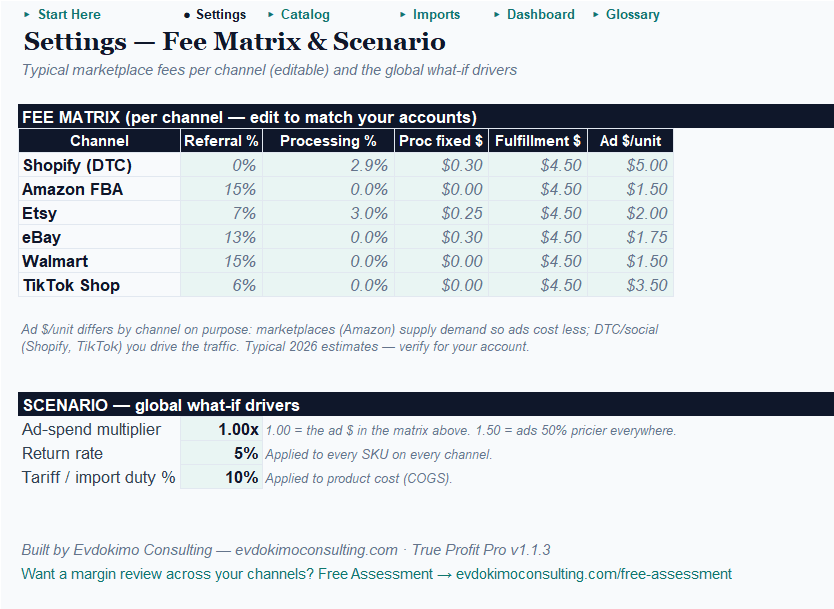
Every preset lives on an open Fee Presets tab — visible, editable, nothing hidden in formulas. They’re typical 2026 estimates; fees vary by category and account, so confirm yours and adjust in seconds. Then it’s three steps:
1
Pick your channel
The fee presets fill in — all visible, all editable.
2
Enter the product
Price, cost, shipping, packaging, ad spend per unit, return rate.
3
Read the Dashboard
Net margin, profit per unit, break-even price, break-even ad spend, and the waterfall.
Works in Excel and Google Sheets (no macros)
The free edition is round-trip verified: open it in Excel or upload it to Google Sheets and every formula and signal behaves identically. No macros, nothing to enable, nothing to install.
See it in action: the sample catalog
The workbook ships pre-filled with a small Amazon seller’s catalog where healthy, thin, and money-losing products all appear — including one item quietly losing money on every single sale until the calculator flagged it red. Open it, switch channels, watch every number recompute — then type over the example with your own products.
Free vs. Pro: which channel should each product live on?
Free shows one channel’s truth. Pro shows all six — and which channel each product should live on.
| Free — True Profit Calculator (single-channel) | Pro — All-Channel & Bulk SKU | |
|---|---|---|
| Price | Free (email) | $19 one-time |
| Platform | Excel and Google Sheets | Excel only (macros) |
| Fee presets (six channels, editable) | ✓ one at a time | ✓ full matrix side by side |
| True profit per unit + net margin | ✓ | ✓ per SKU per channel |
| “Where your money goes” waterfall | ✓ | ✓ |
| Break-even price + break-even ad spend | ✓ | ✓ per channel |
| Six-channel profit heatmap | — | ✓ green = best, red = loss |
| Best-channel call per product | — | ✓ + “move these SKUs” list |
| Catalog scale | A handful of products | Hundreds of SKUs |
| Scenario dials (ad cost × / returns / tariff) | — | ✓ whole catalog at once |
| Shopify + Amazon order-export import | — | ✓ |
| Paste-into-Claude AI commentary | — | ✓ (+ no-AI fallback) |
Free tells you what one channel really pays. Pro tells you where every product should live.
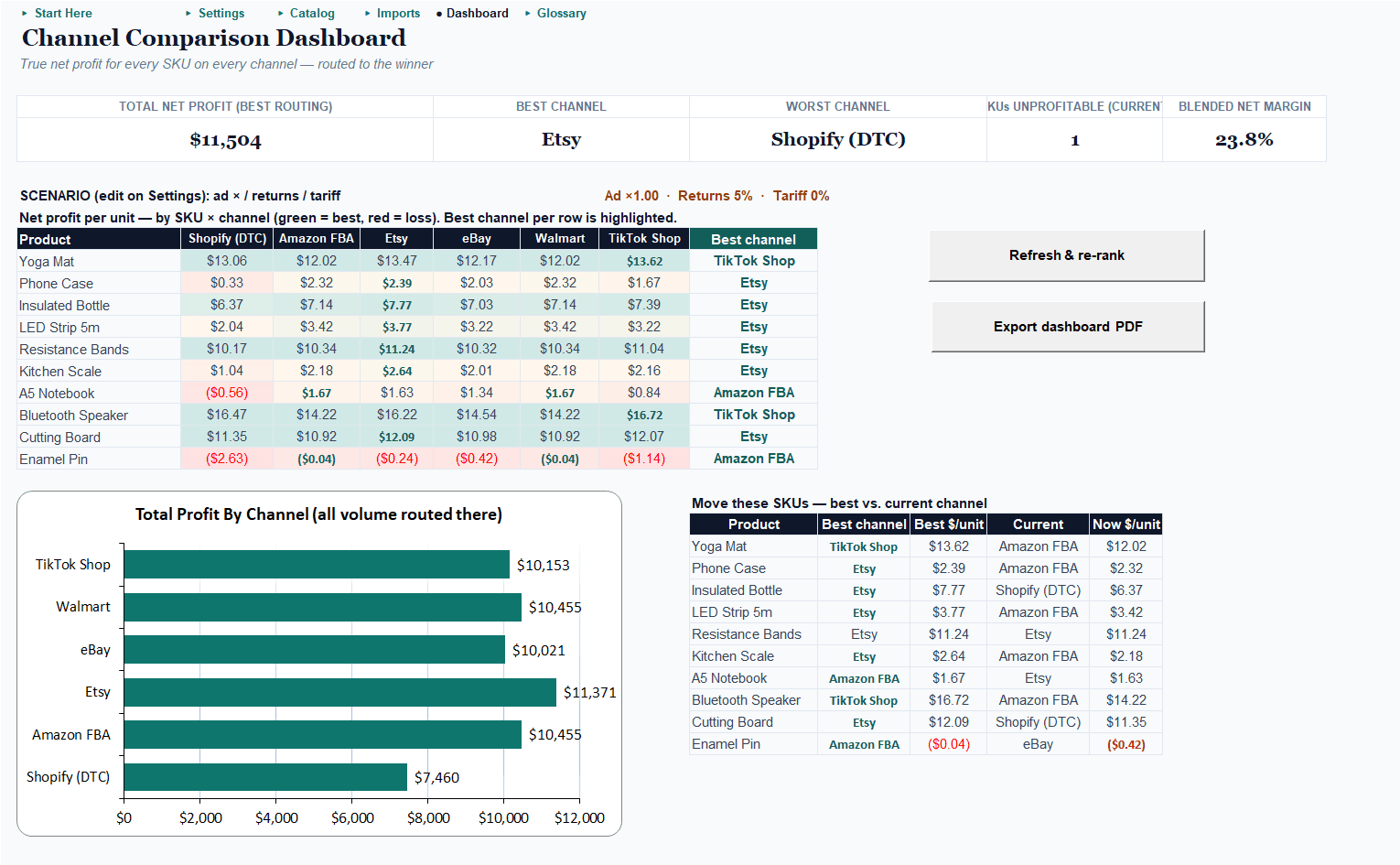
The same product doesn’t earn the same everywhere.
Pro puts every SKU on a six-channel profit grid — a heatmap where green is your best channel and red is a loss — and calls the winner per product. In the sample catalog the best channels genuinely differ across Etsy, TikTok Shop, and Amazon; one product loses money on every channel (Pro finds those too), and one is unprofitable on its current channel with a better home one column over.
Marketplaces bring built-in traffic; your own store makes you buy the clicks — so the winner depends on each product’s price and margin, and Pro models per-channel ad cost to keep the routing honest. Stress-test the whole catalog against ad costs, return rates, and tariffs with three dials. Imports your Shopify or Amazon order exports. Built for catalogs of hundreds of SKUs. Excel, one-time purchase.
Get the free profit calculator
Enter your email and we’ll send the download link — plus a short series on getting the most from it.
We'll email the download link. No spam — unsubscribe anytime.
Every engagement comes with a number — the free tools included. Selling well but the numbers feel off? A second set of eyes is free. Start with a free assessment →
Frequently asked questions
Is it really free?
Yes — the Single-Channel Calculator is a free download; we ask for your email so we can send the file and occasional useful tips. Unsubscribe anytime.
Do I need Excel, or does Google Sheets work?
Either. The free edition uses no macros and is round-trip verified in both Excel and Google Sheets.
Which channels does it cover?
Fee presets ship for Amazon FBA, Shopify, Etsy, eBay, Walmart, and TikTok Shop. The free edition calculates one channel at a time; Pro compares all six side by side for every product.
How accurate are the fee presets?
They're typical 2026 estimates, shown on an open Fee Presets tab you can edit — fees vary by category and account, so confirm yours and adjust. Nothing is hidden in formulas.
What's break-even ROAS?
The ad efficiency you must beat to profit: revenue per ad dollar at which a sale earns exactly zero. Spend less efficiently and every ad-driven sale loses money. The calculator shows it per product, next to the break-even price.
What does Pro add?
Every product on a six-channel profit heatmap with a best-channel call, catalog-scale imports from Shopify and Amazon order exports, and three scenario dials (ad costs, returns, tariffs) that stress-test the whole catalog at once. One-time $19.
Let’s find your number.
Start with the free calculator — or tell me what you’re selling, and we’ll find the one number worth moving first.